AI-powered dashboards · CloudBees Unify
Designing a unified AI analytics experience for CI pipelines
COMPANY
ROLE
Design completed · Deprioritised before development
EXPERTISE
AI, Data
Visualization, DevTools
YEAR
2026
TL;DR
Engineering teams at CloudBees were piecing together pipeline health from Jenkins, GitHub Actions, Slack, and spreadsheets. The existing dashboard gave them numbers but not insight.
As Lead Product Designer I conducted and synthesised research with 30 participants, explored four strategic directions, and delivered a validated design for a unified intelligence layer; combining structured preset dashboards with proactive AI-surfaced anomalies and trend alerts.
The project was deprioritised mid-design process as the company reconsidered whether dashboards or a conversational AI interface was the right strategic direction. The design work is complete. The build decision was not mine to make.
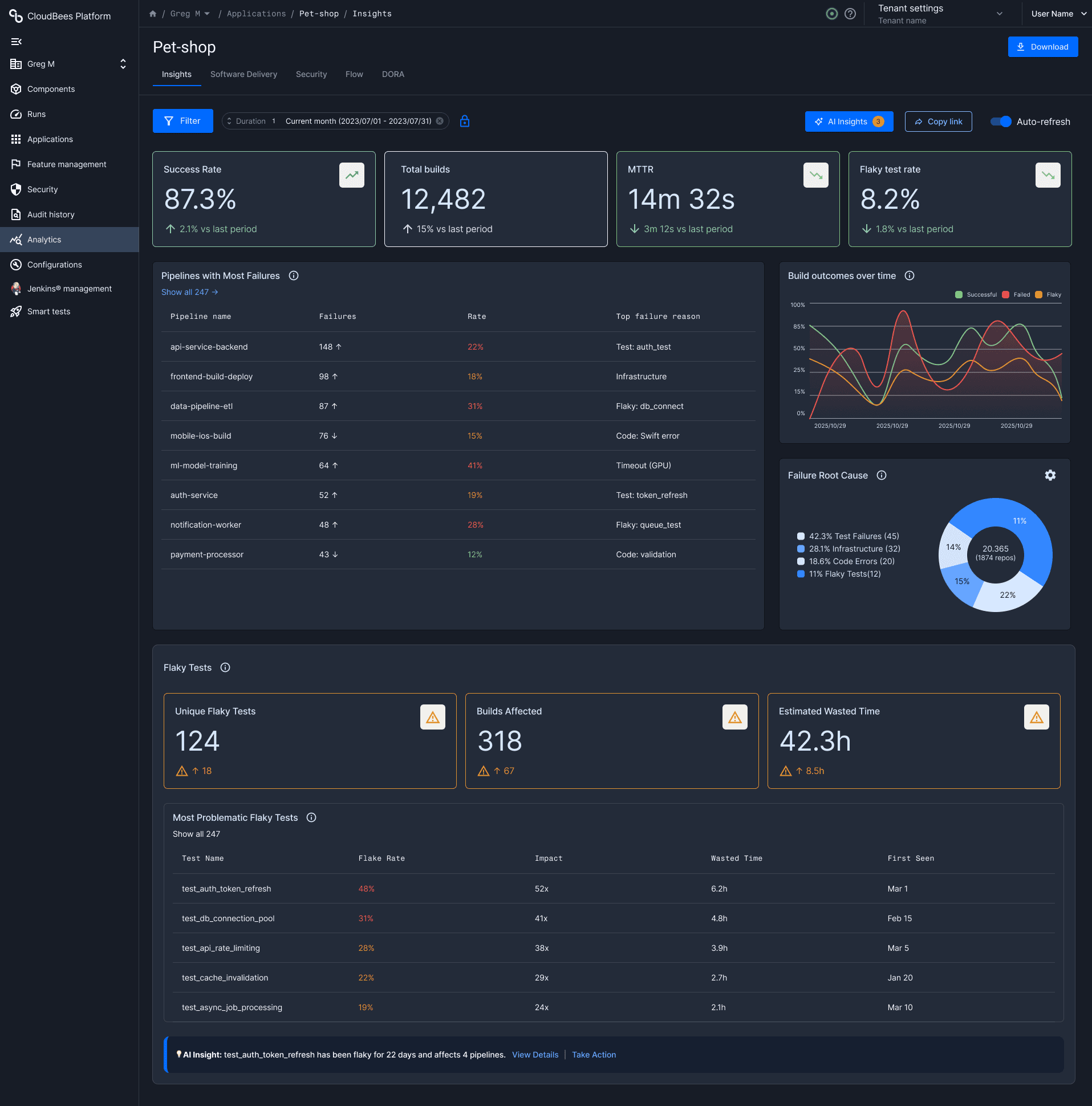

CloudBees Unify gives engineering teams a central place to monitor software delivery across tools, pipelines, and environments. In practice, teams weren't using it as their source of truth, they were jumping between Jenkins, GitHub Actions, Slack, and spreadsheets to piece together a picture of pipeline health.
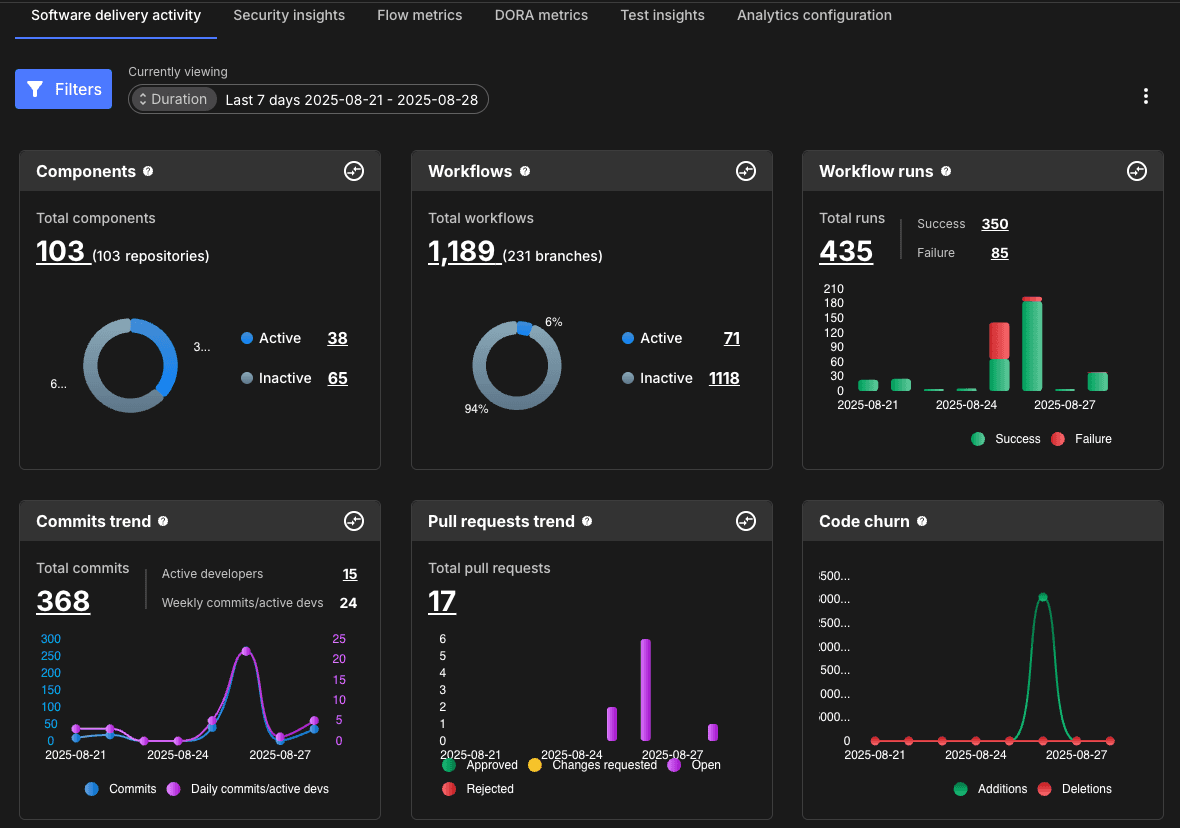
The existing dashboard was functional but shallow: basic metrics, an outdated visual design, and no way to dig deeper when something looked wrong. It told you numbers but not what to do with them.
As AI capabilities became a real possibility within the platform, the opportunity emerged to redesign not just the interface, but the entire relationship between the user and their pipeline data.
Timeline
Design work through 2026. The project was deprioritised before development began, as the company entered a strategic reassessment of its AI product direction; weighing dashboard-based intelligence against a conversational AI approach. The designs shown here represent completed, validated work.
Background
CloudBees Unify is an enterprise platform for monitoring software delivery across complex, multi-tool environments. The core promise; one place to understand pipeline health; was undermined by a dashboard that surfaced metrics in isolation with no guidance on what to do with them.
Problem
Engineering teams were flying partially blind. The data existed; success rates, failure trends, flaky tests, MTTR; but it lived across multiple tools and required manual interpretation to connect into anything meaningful.
The existing dashboard surfaced metrics in isolation. There was no way to identify whether a failure pattern was a one-off or a growing trend, no prioritisation of what needed attention first, and no path from "something looks off" to "here's what to do about it."
The result: slower incident response, inconsistent visibility across teams, and leadership making decisions without reliable data.
Users described the previous experience as a starting point that quickly sent them elsewhere; it created more questions than it answered.
This project followed an iterative and collaborative design approach, building on existing research while adapting to new product requirements and opportunities.
Discovery & Alignment
I inherited prior user research covering 30 participants across engineering teams in the UK, US, Europe, and Canada. Rather than starting from scratch, I focused on pressure-testing those findings with product and engineering; identifying where the research was solid and where assumptions needed challenging.
From that foundation, we defined the core design challenge: users didn't need more data. They needed the right signal at the right moment.
Exploration & Direction Setting
I explored four directions before converging on a recommendation:
AI-powered dashboard with integrated insights - a unified view combining pipeline metrics with AI-generated recommendations
Smart tests integration - surfacing test intelligence directly within the existing UI
Slack-based first responder alerts - pushing critical signals to where engineering teams already work
Conversational AI / chatbot - a natural language interface for querying pipeline data
Each direction was evaluated against user needs, engineering feasibility, and the core problem of fragmented visibility. The dashboard approach was the strongest fit - it didn't require users to change their behavior or initiate interaction, and it worked across all three personas.
This recommendation met stakeholder friction. The Head of Product favored the chatbot direction for its lower development cost and faster delivery timeline. I advocated for the dashboard based on the research, but the business decision is still being worked through. It was a valuable lesson in connecting design recommendations to engineering effort and business ROI from the start - not just at the end.
Design & Prototyping
Working within an established design system - including a grid and widget library created by another designer on the team - I designed preset dashboard layouts in two and three column configurations. The constraint of adapting to an existing component system rather than building from scratch was a real one, and it pushed me to focus on information hierarchy and layout logic rather than component invention.
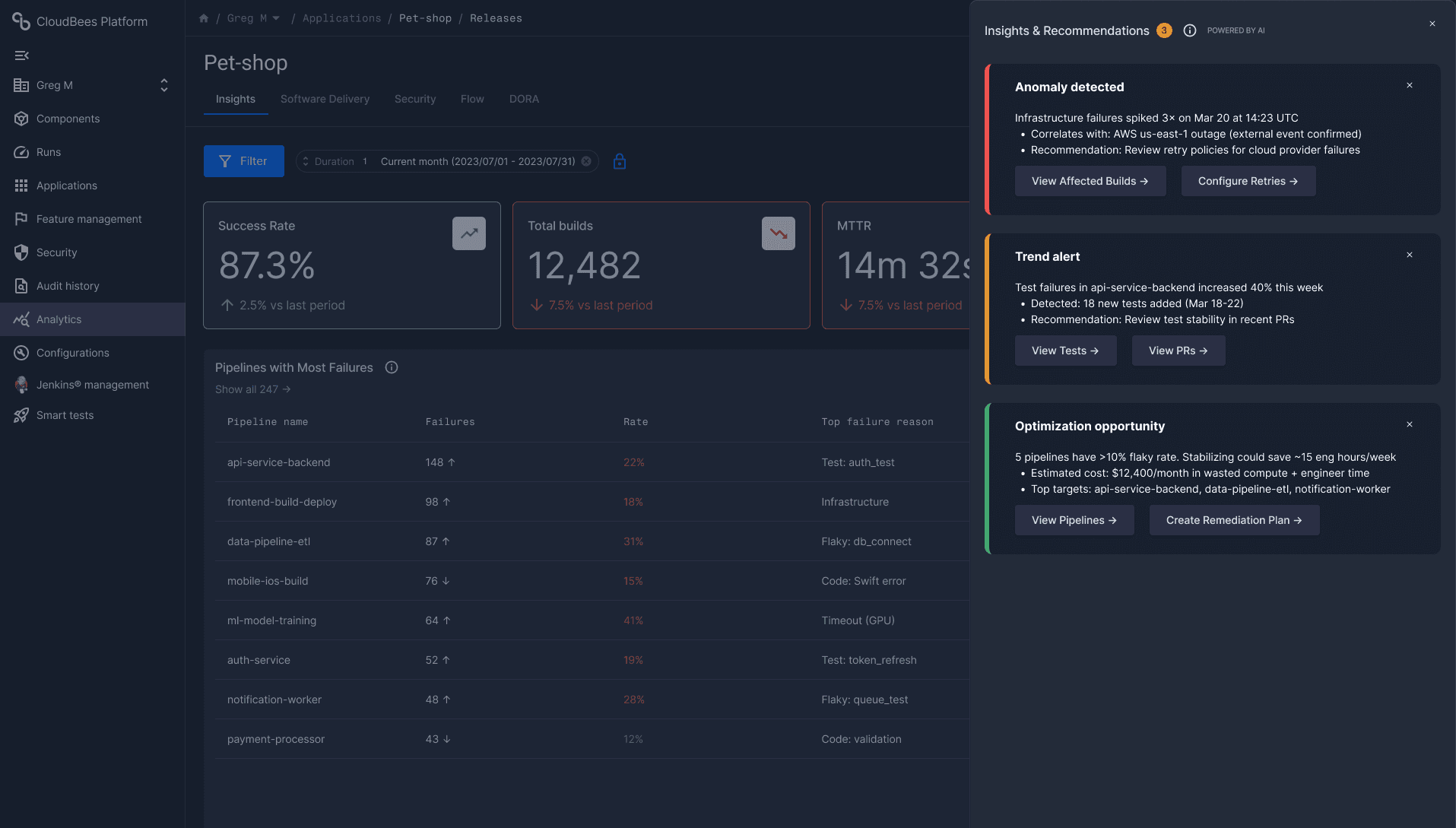
AI capabilities were integrated as a layer on top of the data: anomaly detection, trend alerts, and optimization recommendations that surface proactively rather than waiting for the user to dig.
Collaboration & Iteration
Close collaboration with engineering was essential to keep the AI recommendations grounded in what the system could actually deliver reliably. We iterated on how recommendations were framed - specificity, confidence signaling, and actionability - to avoid the trust problems that plague AI features when outputs feel unreliable or opaque.
Validation
The designs were validated through internal reviews and feedback sessions with engineering and product. The work reached a completed, sign-off-ready state before the project was deprioritised.
The redesigned experience gives engineering teams a single, intelligent entry point into pipeline health - one that tells them not just what is happening, but what to pay attention to and why.
AI-Driven Insights Layer
The AI surface proactively flags anomalies, surfaces trend alerts across pipeline runs, and identifies optimization opportunities - reducing the effort of interpretation and helping teams act faster when something goes wrong.
Structured Dashboard Layouts
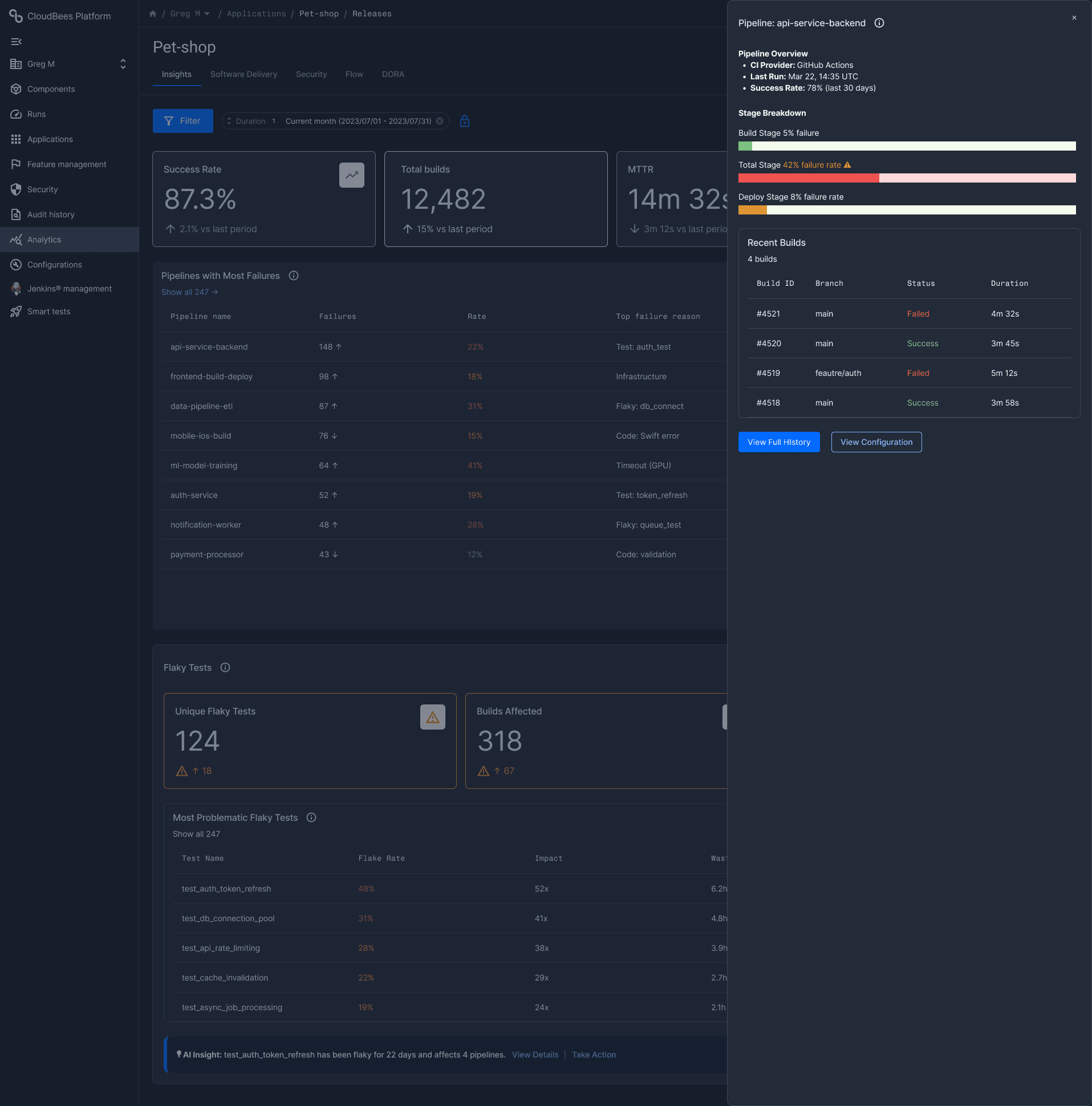
Rather than an open-ended drag-and-drop system, the design works within a disciplined preset layout system - two and three column configurations built on an established widget grid. The constraint improves consistency and makes the experience scalable across different team configurations and screen contexts.
Improved Data Visualization
Charts and data components were redesigned to make patterns readable at a glance - supporting both the leadership user who needs a quick overview and the platform engineer who needs to drill down into failure root causes.
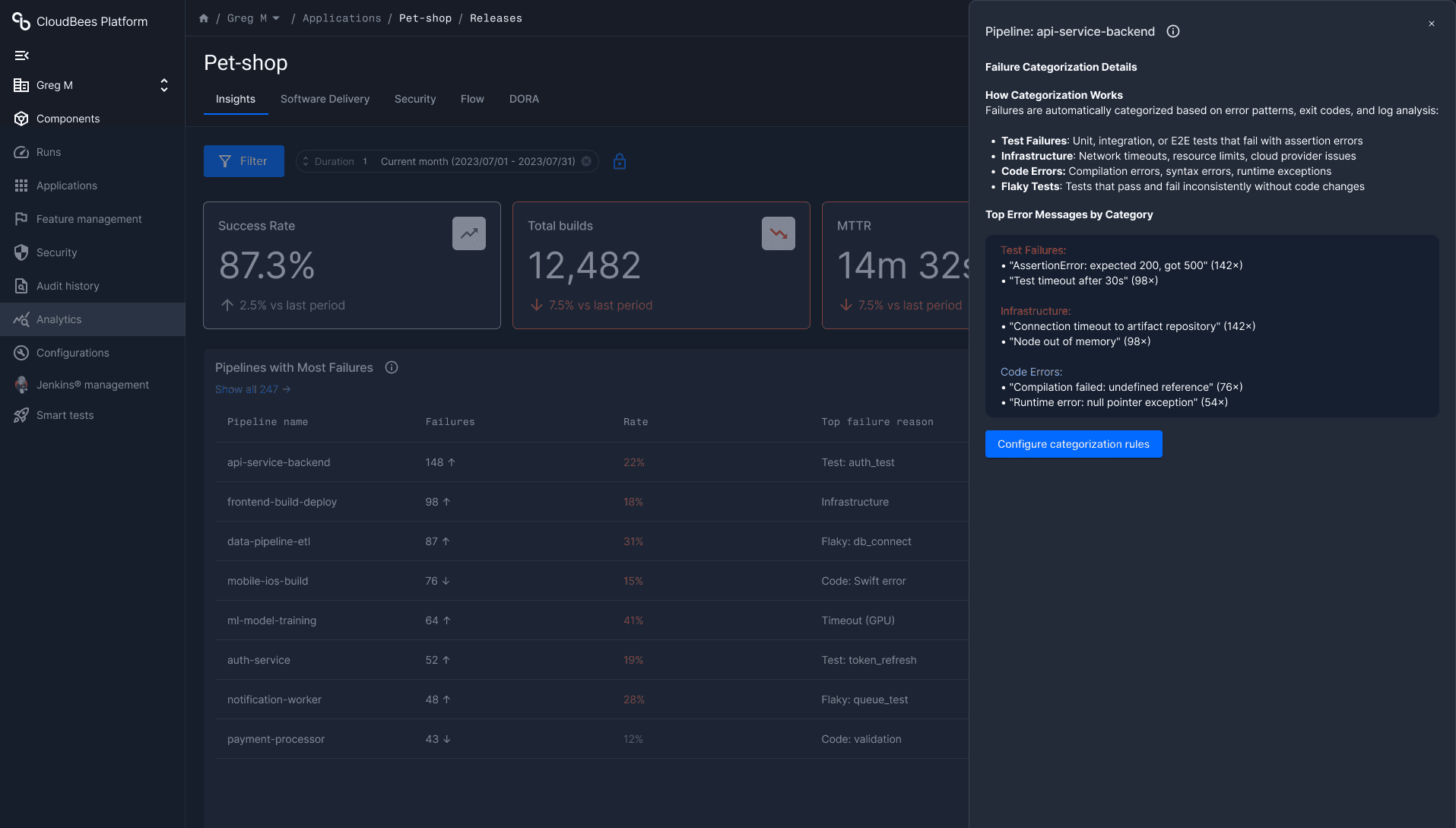
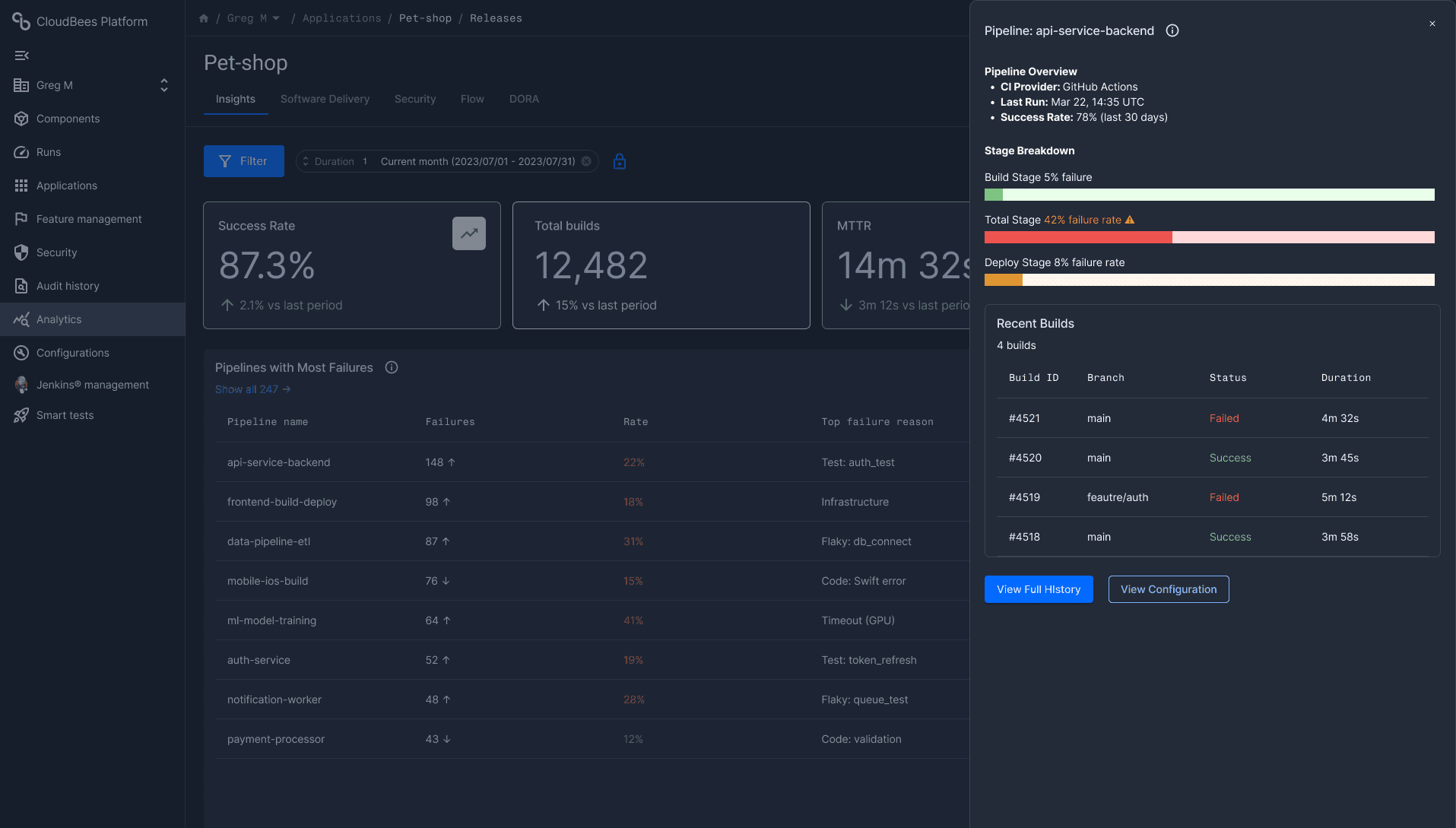
This project was deprioritised before development began. The company entered a strategic reassessment of its AI direction, weighing the dashboard approach against a conversational AI interface. The outcomes below reflect what the design was built to achieve, based on validated user research and internal alignment; not measured post-launch results.
A single source of truth for pipeline health
The design would have given engineering teams one entry point for pipeline health; replacing the fragmented, tool-hopping workflow that was costing teams time and confidence every day.
Faster incident interpretation
The AI layer was designed to cut the time spent manually connecting dots across failure patterns and trends; surfacing the right signal without requiring the user to go looking for it.
A scalable foundation
The preset layout system and widget architecture were designed to grow with customer environments, supporting more teams and more data without requiring a redesign.
Internal alignment achieved
Design reviews with engineering confirmed feasibility of the core AI insight layer. The work reached a validated, development-ready state before the project was stopped.